

Most editing roundups rank the same ten famous apps, then argue about the order. Our database tracks 206 image and video tools, so the famous ten are a thin slice of what exists. The rest are niche editing apps: tools built for one job, one platform or one kind of creator, and for plenty of people one of those is a better fit than the default download everyone else has. This quiz finds yours in about two minutes.
What the database actually looks like
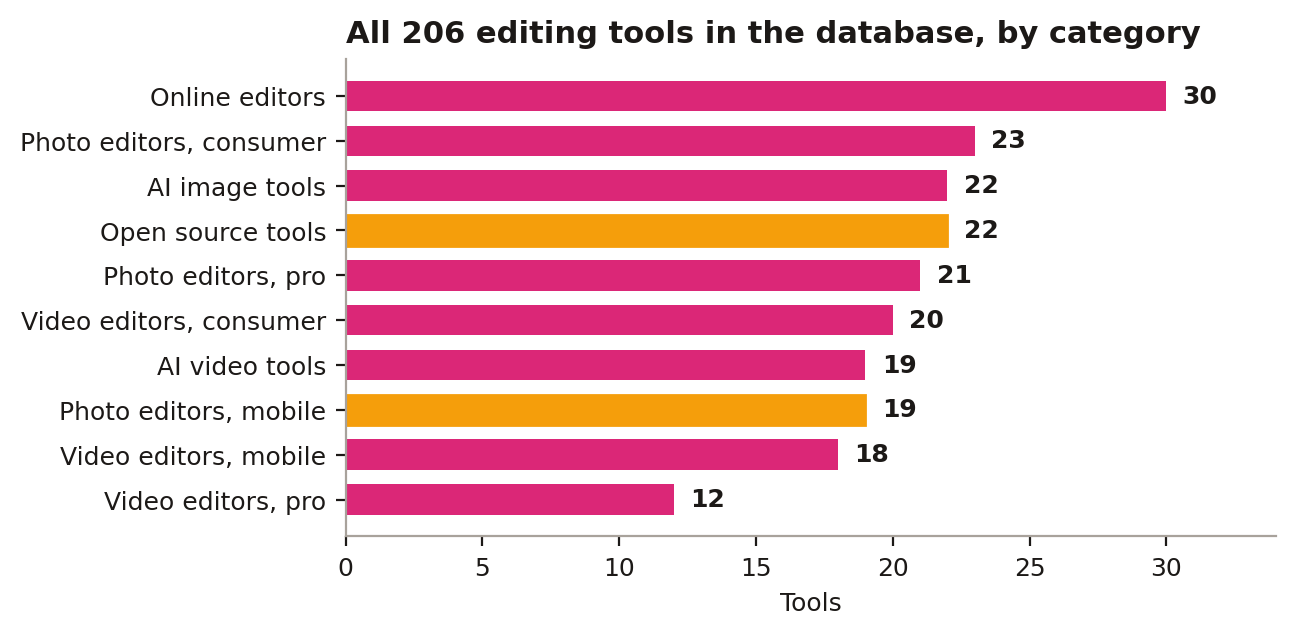
Ten categories, and the biggest one is not a famous desktop suite. Online editors lead with 30 tools, then consumer photo editors at 23. AI image tools and open source tools tie at 22 each, which means 41 of the 206 tools are AI-led once you add the 19 AI video tools. Pro video editors, the category most roundups fight over, are the smallest group at just 12. The long tail is the story: whatever specific thing you do, whether that is batch work, film looks, focus stacking or quick phone edits, there is a category of tools built only for that, and most of them never appear in a top-10 list.
The quiz: five questions, three apps
1. Phone or computer? Phone: CapCut plus VSCO. Computer: DaVinci Resolve plus Affinity.
2. Photos or video? Photos: Lightroom Mobile plus Snapseed. Video: VN plus CapCut.
3. Free or paid? Free: Affinity, DaVinci, Snapseed, CapCut. Paid sweet spot: VSCO at $2.49/mo, LumaFusion at $29.99 once.
4. Beginner or pro? Beginner: CapCut, InShot, Picsart. Pro: DaVinci Studio at $295, Final Cut Pro at $299, Capture One.
5. Presets or manual? Presets: VSCO, plus our curated packs. Manual: Polarr, Affinity, darktable.
Read your five answers as a shortlist, not a shopping list. The overlap is your stack: the app that shows up twice is your editor, the look you picked in question five is your preset app, and the third slot is a converter, which is covered below.
Why the niche pick usually wins
A niche tool does one thing deeply instead of twelve things adequately. That shows up in the numbers: 148 of the 206 tools in the database include AI features, and 155 offer a free tier, so picking a specialist does not mean paying more or trusting something obscure. It means the developer spent the whole budget on your problem. A general editor has to serve wedding photographers, realtors and meme makers at once. A niche app only has to serve you, and it can assume your file types, your platform and your workflow. That is also why the quiz asks about device and budget before taste: in a 206-tool field, those two filters cut the list to a handful before opinions even matter. Fifty of the tools open RAW files, 22 list MKV support, and only 85 run on Mac, so your constraints quietly eliminate most of the database. What is left is small enough to actually try, which is the real point of a two-minute quiz.
Reading your result like an editor
Two more filters explain why quiz answers differ so much from person to person. Platform first: 103 of the 206 tools run on Windows, 79 in a web browser, 72 on iOS, 63 on Android and only 28 on Linux, so a Linux shooter and an iPhone shooter are effectively shopping in different stores. Ambition second: only 11 tools in the database list 8K support, and just 30 top out at exactly 4K, so if your camera shoots beyond 4K your shortlist shrinks again before price enters the picture. None of this requires an account or a download to check. It is counting. The famous apps survive every filter, which is why they are famous, but they are rarely the only survivors. Usually two or three niche tools survive with them, at lower prices, with free tiers (155 of the 206 tools offer one), and with interfaces built around the one job you actually do every day. Try the survivors in the order the quiz surfaces them, keep the one that feels fastest after a week, and delete the rest. A stack you chose on purpose beats a stack you inherited from a ranking.
Fill the converter slot free
Your stack is three apps: one editor, one preset or look app, one converter. PicConvert covers the converter slot: it converts and compresses images right in your browser, free, with nothing to install. Whatever odd format a niche editor exports, PicConvert turns it into the JPG, PNG or WebP file your platform actually wants. Take the quiz, note your three apps, and go shoot something.
Sources: Adobe, Blackmagic Design