

Preset packs used to start from someone else's JPEG. Now they start from RAW: most quality packs ship as DNG files, which are RAW files wearing a preset. That one change reorders this whole guide, because before you can install a pack you need a phone app that can open the DNG in the first place, and most cannot.
Start from the file: which phone apps open RAW
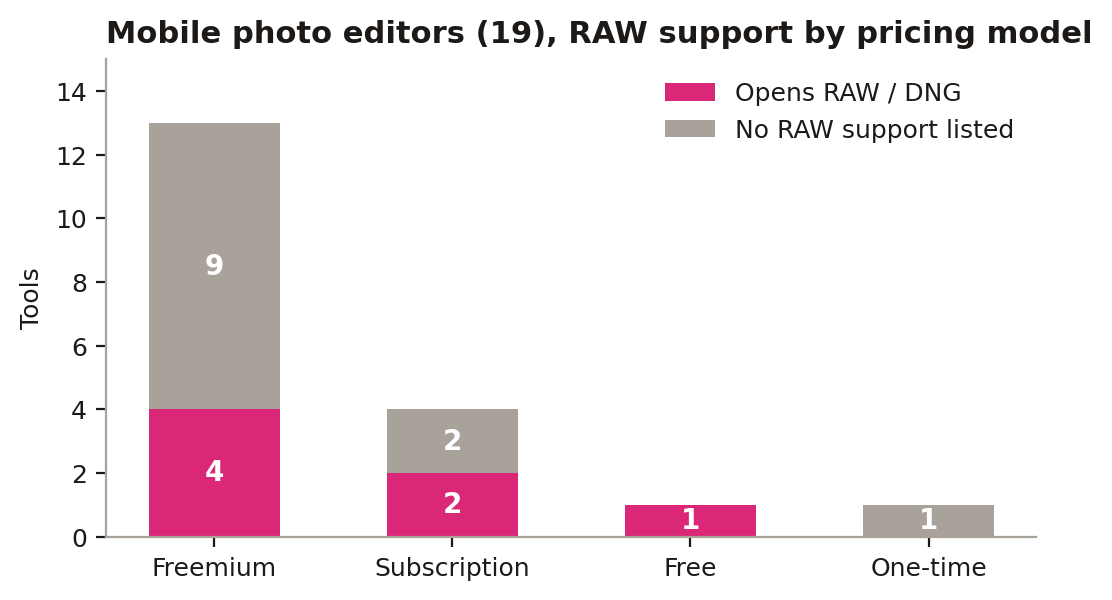
Our database tracks 19 mobile photo editors. Only 7 list RAW or DNG support: Adobe Lightroom Mobile, Afterlight, Darkroom, Enlight Photofox, RNI Films, Snapseed and VSCO. The other 12 are JPEG-only in their listed formats, which makes them preset dead ends no matter how good their filters look. The pricing split is friendly: four of the seven are freemium, two are subscriptions with free tiers, and Snapseed is simply free. So the download order writes itself. Install one of the seven first, and treat the other twelve as finishing apps you add later for effects, not as the home for your preset library.
iOS: the DNG workflow
- Buy or download the pack (DNG files for Lightroom Mobile, or in-app packs for VSCO/Polarr).
- Save DNGs to Files, import into Lightroom Mobile.
- Open a DNG, tap the three dots, Create Preset. Done. It now lives in your presets panel.
- VSCO and Polarr packs install inside their apps via QR codes or in-app purchase.
Android: same files, same steps
1. Same DNG workflow in Lightroom Mobile, or download directly in-app. 2. Snapseed cannot import Lightroom presets; use its own Looks system instead.
That Snapseed note matters more now: Snapseed is one of the seven that open RAW files, and it is free, so it is a fine RAW editor on both platforms. It just stores its looks its own way. If your pack is a folder of DNGs, Lightroom Mobile is the reliable importer on iOS and Android alike, and its free tier is enough for the import-and-save step.
The seven, one by one
Adobe Lightroom Mobile (subscription, free tier): the fullest format list of the seven, with JPEG, RAW, DNG, TIFF and HEIF across iOS, Android, web, Windows and macOS. The default home for DNG preset packs.
Snapseed (free): iOS and Android, opens JPEG and RAW (DNG). The only completely free app in the seven, with its own Looks system instead of preset imports.
VSCO (subscription, free tier): iOS and Android, JPEG and RAW. Come for the film looks, stay because it can open the files those looks are built from.
Darkroom (freemium): iOS and macOS only, with JPEG, PNG, RAW and HEIF. The Apple-only pick of the seven.
Afterlight (freemium): iOS and Android, JPEG, PNG, TIFF and RAW. One of the few phone editors listing TIFF alongside RAW.
Enlight Photofox (freemium): iOS only, JPEG, PNG and RAW, and the only one of the seven whose database row flags AI features.
RNI Films (freemium): iOS and Android, JPG, PNG and RAW, built around film simulation looks.
Every one of the seven has a free tier or is free outright, so the RAW-capable phone editor costs nothing to test. Download two, open the same DNG in both, and keep the one whose preset workflow you understand in five minutes.
For completeness, the other 12 mobile photo editors in the database are AirBrush, Bazaart, Facetune, Filmborn, GoDaddy Studio, Lightleap, Mextures, Picsart, Prisma, Remini, TouchRetouch and YouCam Perfect. Several are excellent at what they do, retouching, templates, beauty filters and one-tap effects. Just do not store your preset library in them: with no RAW or DNG in their listed formats, a DNG pack has nowhere to land. Use them after the edit, not as the edit's home.
Shrink the exports before you share them
RAW files edited on a phone come out heavy. PicConvert converts and compresses images in the browser for free, so the photo you edited from a DNG reaches Instagram, a client or a marketplace listing at the right size and format without another app. Our curated preset packs ship as ready-to-import DNGs for both platforms, one-time purchase, no subscription. Buy the pack once, use it on every phone you ever own.
Sources: Adobe, Blackmagic Design