

Price first: Premiere Pro is $22.99/month ($275/year) with a 7-day trial. DaVinci Resolve has a fully usable free version, and Studio is $295 one-time. That is the famous version of this fight. The less famous version matters if you edit on a Mac: these two are not the whole field, and the field they sit in is smaller and more subscription-heavy than most buyers expect.
The Mac field these two sit in
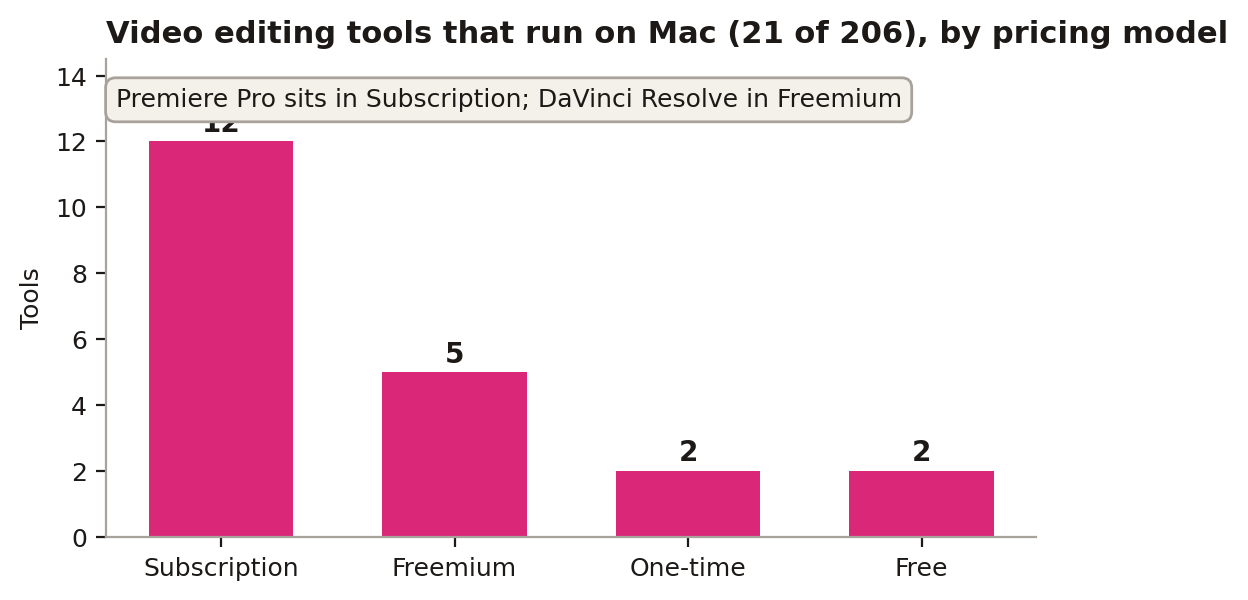
Our database tracks 206 tools, and 85 of them run on Mac, but most of those are photo tools. Filter down to video categories only (pro, consumer, mobile and AI video editors that list macOS support) and the field shrinks to 21 tools. Twelve of the 21 are subscriptions. Five are freemium, two are free, and just two are one-time purchases: Final Cut Pro at $299.99 and Adobe Premiere Elements. That is the real context for the Premiere versus DaVinci question on Mac. Premiere Pro, listed in our database as a subscription on Windows, macOS and iOS, is the mainstream choice in a mainstream-priced field. DaVinci Resolve, listed as freemium with a free tier across Windows, macOS and Linux, is the odd one out: a pro editor whose free version is not a trial. When 12 of 21 rivals charge rent, the free version plus a $295 one-time Studio upgrade is a genuinely different offer, not a marketing line.
Pick Premiere Pro if this sounds like you
Pick Premiere Pro if you live in Adobe's ecosystem: After Effects handoffs, team projects, client templates built for Premiere, plus constant updates and Adobe Fonts. The subscription buys you the network as much as the software. If your collaborators, clients and template shops all speak Premiere, the $22.99 a month is the cost of staying fluent, and switching would cost more in friction than it saves in fees.
Pick DaVinci Resolve if color is the job
Pick DaVinci Resolve if color grading matters to you. The free version cuts, grades, and exports 4K with no watermark. The $295 Studio license pays for itself in 13 months versus Premiere. Resolve also treats Mac as a first-class platform rather than a port, and its free tier means your projects are never held hostage by a lapsed subscription. For solo creators and color-led work, that math is hard to argue with.
The other 19 on the Mac list
It is worth knowing who else is in the room. The 21 Mac video tools include Avid Media Composer on subscription for broadcast-style work, Final Cut Pro as the other one-time purchase, CapCut and VN reaching the Mac from mobile, Lightworks and Descript on freemium tiers, and consumer options like Wondershare Filmora and CyberLink PowerDirector on subscription. Two of the 21 are completely free. Format support separates them further: our database lists DaVinci Resolve handling BRAW alongside ProRes, DNx and MXF, with output up to 8K, while Premiere Pro covers MP4, MOV, AVI, MXF, ProRes and H.264. Only 11 tools in the entire 206-tool database list 8K support at all. None of these rivals changes the headline choice for most people, but they change the fallback: if Premiere's rent annoys you and Resolve's color-first layout does not fit, the Mac field still holds 19 other editors, and five of them will not charge you to find out whether they fit.
A practical way to settle it: cut the same five-minute project in both. The trial and the free tier mean that test costs nothing but an afternoon. Time the export, grade one difficult clip in each, and try opening the project a week later. The database can narrow the Mac field to 21 names and two finalists, but render speed on your machine and the layout your hands learn are facts no table holds. Pick on those, and the pricing math above will usually agree with your hands.
Finish the job outside the editor
Whichever editor wins, keep format chores out of it. PicConvert converts and compresses images in your browser for free: poster frames, thumbnails and stills pulled from a project, sized and converted without opening a second pro app. Most creators do not need both editors. Pick the one your collaborators use, because project files do not cross over.
Sources: Adobe, Blackmagic Design