
.png)
Download the free tier first, always. That advice is easy to give and easy to follow, but it hides the one question that decides whether free is enough: does the free version open your files? If you shoot RAW, the free-versus-paid debate looks completely different, because RAW support is where the database splits.
The RAW test: what the data says
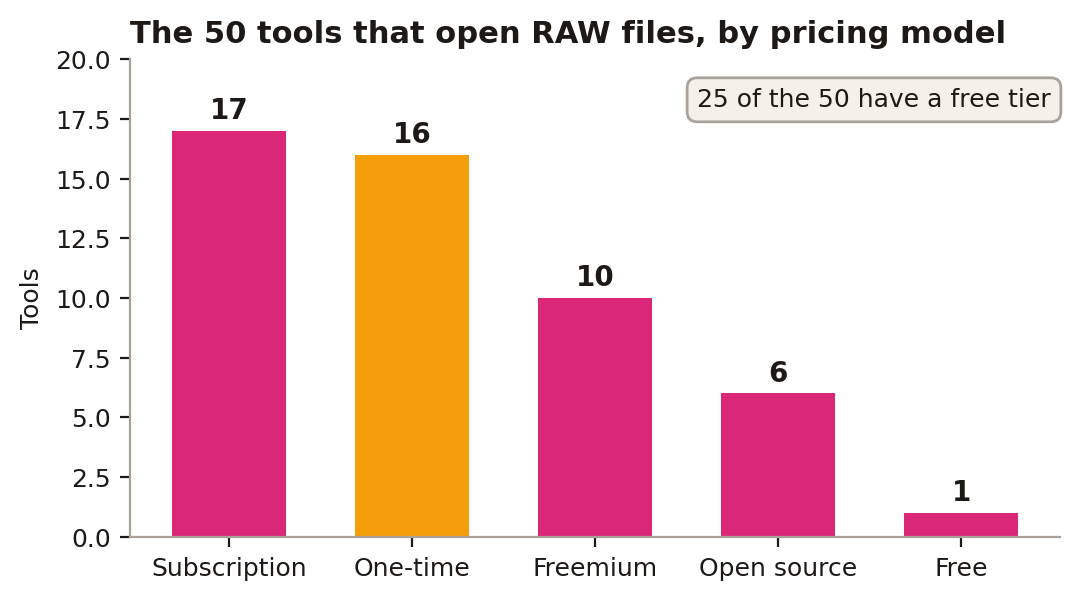
Only 50 of the 206 tools we track list RAW or DNG support. Split those 50 by pricing model and the pattern surprises most people: subscriptions lead at 17, but one-time purchases are right behind at 16, freemium contributes only 10, open source 6 and outright free just 1. Freemium is the biggest model in the whole database, with 103 tools, yet only 10 of them open RAW files. In other words, the free tier of a typical freemium app is built for quick JPEG edits, not for a photographer's RAW workflow. The good news sits in the same chart: 25 of the 50 RAW tools have a free tier, so half the RAW-capable field costs nothing to start. You just have to pick from the right half.
The free downloads that earn their place
- Snapseed: free, does 80% of pro edits.
- Lightroom Mobile: free tier with solid presets.
- Photopea: free PSD editing in a browser.
- darktable: free RAW processing on desktop.
- PicConvert: free forever for format conversion and compression.
Notice how many of those pass the RAW test. Snapseed opens DNG files on your phone, darktable is a full RAW processor on desktop, and Photopea lists RAW among its supported formats in our database. The free tier is not a toy tier if you choose from the RAW-capable list instead of the app-store charts.
Pay when free stops working
- VSCO membership ($2.49-$5/month): the film preset library is the product. - Polarr Pro ($2.49/month): masking and custom presets worth paying for. - Lightroom plan ($9.99/month): cloud sync plus the full preset ecosystem. - Pixelmator Pro ($49.99 once): Mac users who want to own, not rent.
Every paid pick above earns its money on a workflow feature, not on basic RAW access: a preset library, masking, cloud sync across devices. That is the healthy way to upgrade. If a paid app is asking you to rent the simple ability to open your own camera files, the chart at the top of this page says 16 one-time purchases and 6 open source tools will sell or give you that outright.
The middle shelf: open source and the one free RAW app
Between the freemium shelf and the paid shelf sits a smaller one worth knowing about. Six open source tools in the database open RAW files: darktable, RawTherapee, digiKam, LightZone, Luminance HDR and Siril. They cost nothing, carry no tier at all, and several are serious RAW processors that photographers build whole workflows on. And in the outright-free pricing model, exactly one tool of the five listed opens RAW: Snapseed. That is why Snapseed keeps appearing in this guide. It is not the best free editor by opinion; by the data, it is the only completely free app in the database whose listed formats include RAW. So the honest free-versus-paid answer for RAW shooters is a shortlist, not a debate: Snapseed on the phone, darktable or RawTherapee on the desktop, Photopea in the browser, and a paid plan only when a workflow feature like sync or a preset library starts saving you real hours.
One more pattern from the same data: 31 of the 50 RAW tools include AI features, so going free or one-time does not mean giving up the modern tools. And across the whole database, free tiers are common (155 of 206 tools have one), which is exactly why the download-first rule works. The catch is only ever the format list. Check that first, and the free-versus-paid question answers itself for most creators.
Convert and compress without another subscription
Whichever side of free versus paid you land on, keep the boring jobs out of your editor. PicConvert converts and compresses images in the browser for free, so your RAW editor stays an editor and your exports come out the right format and size the first time. Rule of thumb: if the paid feature saves you an hour a week, it pays for itself. If you opened it twice, cancel it.
Sources: Adobe, Blackmagic Design